Defining Locations
Locations represent targets where the requests are routed to. Within a location you can define multiple node groups and multiple nodes within a group. This is well defined for CDN use cases, where multiple caching engines could serve the same content within a same datacenter. Each node must define an IPv4 or IPv6 address, these addresses will be returned from the EdgeCDN-X DNS if they match the prerequisites.
Creating Locations
Like zones and records, locations belong to a project and must be created in the project namespace. The examples below continue with the edgecdnx namespace, the edgecdnx project and the edgecdnx.com zone created in the previous guides.
We will define two locations, fra1-c1 and ams1-c1. Both carry the same location labels, while their node groups carry an additional cache label:
apiVersion: infrastructure.edgecdnx.com/v1alpha1
kind: Location
metadata:
  name: fra1-c1
  namespace: edgecdnx
  labels:
    region: eu
    tier: edge
spec:
  project:
    name: edgecdnx
  weight: 3
  fallbackLocations:
    - ams1-c1
  geoLookup:
    weight: 50
    attributes:
      geoip/continent/code:
        weight: 1000
        values:
          - value: EU
      default:
        weight: 1
  nodeGroups:
    - name: ssd
      flavor: ""
      labels:
        cache: ssd
      nodes:
        - name: n1
          ipv4: 192.168.80.10
        - name: n2
          ipv4: 192.168.80.11
    - name: hdd
      flavor: ""
      labels:
        cache: hdd
      nodes:
        - name: n3
          ipv4: 192.168.80.12
---
apiVersion: infrastructure.edgecdnx.com/v1alpha1
kind: Location
metadata:
  name: ams1-c1
  namespace: edgecdnx
  labels:
    region: eu
    tier: edge
spec:
  project:
    name: edgecdnx
  weight: 1
  fallbackLocations:
    - fra1-c1
  geoLookup:
    weight: 50
    attributes:
      geoip/continent/code:
        weight: 1000
        values:
          - value: EU
      geoip/country/code:
        weight: 100
        values:
          - value: NL
          - value: BE
  nodeGroups:
    - name: ssd
      flavor: ""
      labels:
        cache: ssd
      nodes:
        - name: n1
          ipv4: 192.168.80.20
➜  kubectl apply -f locations.yaml
location.infrastructure.edgecdnx.com/fra1-c1 created
location.infrastructure.edgecdnx.com/ams1-c1 created
The most relevant location fields are:
| Field | Description |
|---|---|
metadata.labels |
Location labels, used by route selectors to pick candidate locations. |
spec.project |
Reference to the owning project. Immutable. |
spec.weight |
Weight of the location for the Weighted routing policy. |
spec.fallbackLocations |
Ordered list of locations tried when this location has no healthy matching node. |
spec.parent |
Parent location for hierarchical setups. Cannot be combined with fallbackLocations. |
spec.maintenanceMode |
Removes the whole location from routing. |
spec.geoLookup |
Attributes and weights used by the Geolocation routing policy. |
spec.nodeGroups[].labels |
Node group labels, merged with the location labels when filtering nodes. |
spec.nodeGroups[].nodes[] |
Nodes with their ipv4 and/or ipv6 address and an optional maintenanceMode flag. |
How Labels Work
Every node group has an effective label set: the location metadata.labels merged with the node group labels. If the same key is defined on both levels, the node group value wins. For the locations above the effective labels are:
| Location | Node group | Effective labels | Nodes |
|---|---|---|---|
fra1-c1 |
ssd |
region=eu, tier=edge, cache=ssd |
192.168.80.10, 192.168.80.11 |
fra1-c1 |
hdd |
region=eu, tier=edge, cache=hdd |
192.168.80.12 |
ams1-c1 |
ssd |
region=eu, tier=edge, cache=ssd |
192.168.80.20 |
A DNSEndpoint uses a standard Kubernetes label selector in spec.routeSelector. Both matchLabels and matchExpressions are supported. Routing happens in two steps:
- Location selection - the routing policy picks a target location from the candidate locations.
- Node selection - within the target location only node groups whose effective labels match the route selector are considered. Nodes in maintenance mode, failing health checks or with active alerts are skipped. The node is then picked by hashing the queried name, so the same hostname consistently lands on the same node.
If no node is left, the plugin walks the parent location and then the fallbackLocations of the target, skipping any fallback location with no node group matching the route selector.
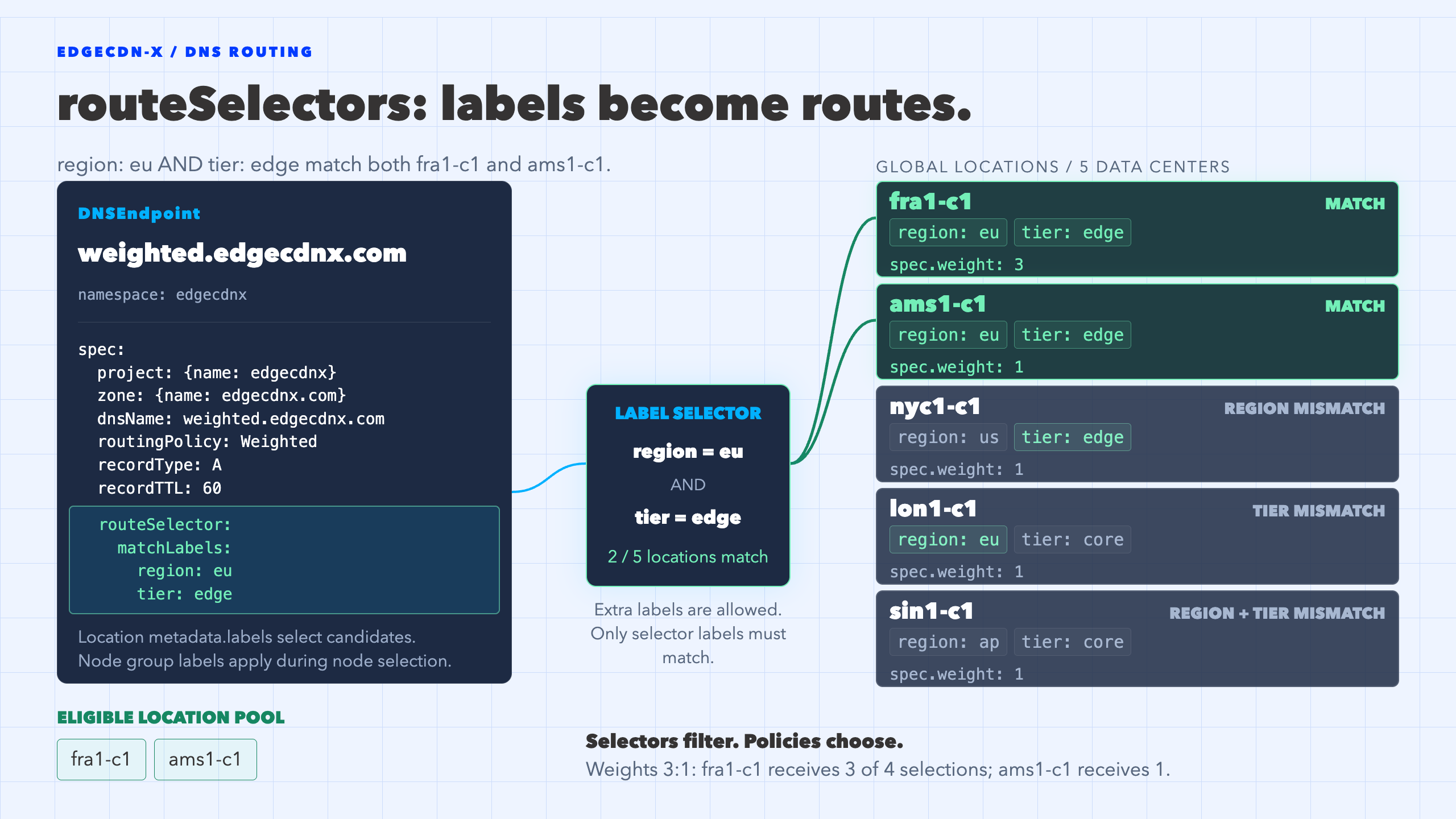
Candidate locations for Weighted and RoundRobin: these policies select candidate locations by matching the route selector against the location
metadata.labelsonly. A selector containing a node group label such ascache: ssdwill match no location for these policies, so use location labels in their route selector.Geolocationevaluates the effective labels of each node group, so node group labels can be used there.
Routing Policies
Routing policies other than Simple resolve to nodes of a location and therefore support only A and AAAA records. An A query returns the ipv4 of the selected node, an AAAA query its ipv6.
| Policy | Location selection | Route selector |
|---|---|---|
Simple |
None, spec.targets are returned as-is. |
Not used |
Failover |
First entry of spec.targets is the primary location name. |
Optional |
Weighted |
Smooth weighted round robin over matching locations using spec.weight. |
Required |
RoundRobin |
Rotates over matching locations in alphabetical order. | Required |
Geolocation |
PrefixList match first, then the best geoLookup score. |
Required |
Failover
Failover routes to the location named in the first entry of spec.targets. The route selector narrows the node groups, so the following record only returns the ssd nodes of fra1-c1:
apiVersion: infrastructure.edgecdnx.com/v1alpha1
kind: DNSEndpoint
metadata:
  name: failover.edgecdnx.com-a
  namespace: edgecdnx
spec:
  project:
    name: edgecdnx
  zone:
    name: edgecdnx.com
  dnsName: failover.edgecdnx.com
  recordTTL: 60
  recordType: A
  routingPolicy: Failover
  targets:
    - fra1-c1
  routeSelector:
    matchLabels:
      cache: ssd
Put fra1-c1 into maintenance and the query falls back to ams1-c1, which is the first fallback location with a node group matching cache: ssd:
➜  kubectl patch location fra1-c1 -n edgecdnx --type merge -p '{"spec":{"maintenanceMode":true}}'
location.infrastructure.edgecdnx.com/fra1-c1 patched

➜  dig @127.0.0.1 -p 62747 failover.edgecdnx.com +short
192.168.80.20

➜  kubectl patch location fra1-c1 -n edgecdnx --type merge -p '{"spec":{"maintenanceMode":false}}'
location.infrastructure.edgecdnx.com/fra1-c1 patched
Weighted
Weighted distributes queries across all locations matching the route selector proportionally to their spec.weight. It uses smooth weighted round robin, so the selections are interleaved rather than sent in bursts. With fra1-c1 at weight 3 and ams1-c1 at weight 1, three out of every four queries are answered from fra1-c1:
apiVersion: infrastructure.edgecdnx.com/v1alpha1
kind: DNSEndpoint
metadata:
  name: weighted.edgecdnx.com-a
  namespace: edgecdnx
spec:
  project:
    name: edgecdnx
  zone:
    name: edgecdnx.com
  dnsName: weighted.edgecdnx.com
  recordTTL: 60
  recordType: A
  routingPolicy: Weighted
  routeSelector:
    matchLabels:
      region: eu
      tier: edge
➜  for i in 1 2 3 4; do dig @127.0.0.1 -p 62747 weighted.edgecdnx.com +short; done
192.168.80.12
192.168.80.20
192.168.80.12
192.168.80.12
Since the selector only contains location labels, all node groups of fra1-c1 are eligible and the hash for weighted.edgecdnx.com picks node n3 of the hdd group.
Weighting rules:
- Locations with weight
0are never selected while another matching location has a positive weight. - If all matching locations have weight
0, they are selected equally. - The rotation state is kept per CoreDNS instance. With multiple replicas behind a load balancer, the ratio holds per replica and the observed order may differ.
Change the weights with kubectl patch and the new distribution takes effect immediately:
➜  kubectl patch location ams1-c1 -n edgecdnx --type merge -p '{"spec":{"weight":3}}'
location.infrastructure.edgecdnx.com/ams1-c1 patched
RoundRobin
RoundRobin rotates over all locations matching the route selector, ignoring their weights. Locations are ordered alphabetically, so the rotation is stable across configuration reloads.
apiVersion: infrastructure.edgecdnx.com/v1alpha1
kind: DNSEndpoint
metadata:
  name: roundrobin.edgecdnx.com-a
  namespace: edgecdnx
spec:
  project:
    name: edgecdnx
  zone:
    name: edgecdnx.com
  dnsName: roundrobin.edgecdnx.com
  recordTTL: 60
  recordType: A
  routingPolicy: RoundRobin
  routeSelector:
    matchLabels:
      tier: edge
Geolocation
Geolocation first checks PrefixList resources for a match on the client source IP or EDNS client subnet. Without a match, locations are scored by their spec.geoLookup attributes against the GeoIP metadata of the request.
CoreDNS GeoIP Metadata
The attribute names in spec.geoLookup.attributes are CoreDNS metadata keys. They are only populated if both the metadata and the geoip plugins are enabled in the CoreDNS server block, as shown in the standalone deployment:
servers:
  - plugins:
      - name: metadata
      - name: geoip
        parameters: /etc/edgecdnx/geolookup/GeoLite2-City.mmdb
        configBlock: |-
          edns-subnet
      - name: edgecdnx
Without these plugins every attribute lookup is empty and only locations with a default attribute can match. With edns-subnet the lookup uses the EDNS client subnet sent by recursive resolvers instead of the resolver address. A City database provides keys such as:
| Metadata key | Example value |
|---|---|
geoip/continent/code |
EU |
geoip/country/code |
NL |
geoip/city/name |
Amsterdam |
See the CoreDNS geoip plugin for the full list.
Scoring
For each candidate location the plugin computes a score:
- For every attribute whose request metadata value is listed in
values, the attributeweightplus the valueweightis added. Value weights are optional and may be negative. - The special
defaultattribute adds itsweightto every request and makes the location match even if no other attribute does. It has novalues. - Locations matching no attribute and having no
defaultare not candidates. - The highest score wins. On a tie, a location is picked randomly, proportionally to
spec.geoLookup.weight. If all tied weights are0, the pick is uniform. - If no location is a candidate, the query is passed to the next CoreDNS plugin.
The locations defined at the top of this page score as follows:
| Client | fra1-c1 |
ams1-c1 |
Winner |
|---|---|---|---|
Germany (EU, DE) |
1000 + 1 = 1001 | 1000 | fra1-c1 |
Netherlands (EU, NL) |
1000 + 1 = 1001 | 1000 + 100 = 1100 | ams1-c1 |
United States (NA, US) |
1 (default) | no match | fra1-c1 |
| No GeoIP data (e.g. private IP) | 1 (default) | no match | fra1-c1 |
The default weight on fra1-c1 makes it the catch-all for clients outside Europe. Because default is also added to European requests, keep it small compared to the attribute weights, otherwise it decides between European locations too.
Now define the record. Here the selector can include node group labels:
apiVersion: infrastructure.edgecdnx.com/v1alpha1
kind: DNSEndpoint
metadata:
  name: geo.edgecdnx.com-a
  namespace: edgecdnx
spec:
  project:
    name: edgecdnx
  zone:
    name: edgecdnx.com
  dnsName: geo.edgecdnx.com
  recordTTL: 60
  recordType: A
  routingPolicy: Geolocation
  routeSelector:
    matchLabels:
      region: eu
      cache: ssd
Querying from the local machine sends a private source address, so there is no GeoIP data and the default attribute routes to an ssd node of fra1-c1:
To simulate a client in the Netherlands, send an EDNS client subnet located there (145.100.0.0/24 resolves to EU / NL in GeoLite2-City). The answer switches to ams1-c1:
A German subnet (81.169.145.0/24, EU / DE) stays on fra1-c1:
See Prefix-Based Routing to override GeoIP decisions for specific networks with PrefixList resources.
Using matchExpressions
Selectors are not limited to exact matches. The following selector matches edge locations outside the us region, and only node groups that carry a cache label:
routeSelector:
  matchLabels:
    tier: edge
  matchExpressions:
    - key: region
      operator: NotIn
      values: ["us"]
    - key: cache
      operator: Exists
Remember that for Weighted and RoundRobin the cache expression would be evaluated against location labels only and match nothing.
Route Selector Example
The diagram below illustrates the Weighted example: only fra1-c1 and ams1-c1 match both region: eu and tier: edge. The additional locations illustrate label mismatches and are not part of the manifests above. The matching locations are then selected according to their weights of 3 and 1.
Healthchecks
Continue on the defining healthchecks page to add active healthchecks to the individual node groups.